Waveform Panel
The Waveform panel is accessed by the 1st tab. In this panel you can load various prestored waveforms, adjust parameters of those waveforms, and select the memory address page.
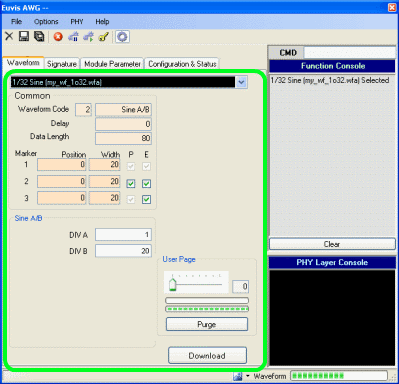
Waveform Selector
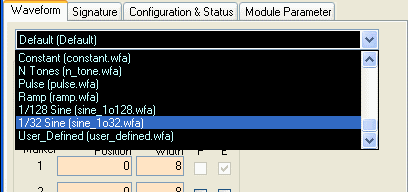
Click on the drop-down list to select a waveform. The software comes with several
pre-defined waveforms and you can
make your own waveforms to put on this list. Please
see the Save Waveform section.
Waveform Parameters
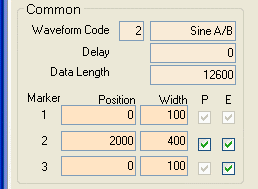
Waveform Code
Specifies the style of waveform to be implemented. Each style has corresponding
specific parameters to adjust the waveform. These parameters may be entered in a
special section below Common parameters only after you have entered a waveform code.
For more details about this, please go to Waveforms
in the Waveform Files section.
Delay
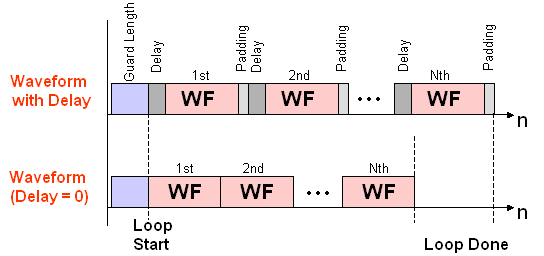
Specifies waveform delay in terms of memory addresses. This is defined in hexadecimal code. Increasing the Delay by 1 delays the desired waveform output by 1 clock (1 sample). For example, if delay were set at "5", the first 5 memory addresses would have the first data value of the waveform, and then at the 6th memory address the waveform amplitude changes would begin.
If you use a non-zero Delay, the total waveform length will be increased by the
Delay plus padding at the end of the desired waveform to ensure that the output
total waveform length is a multiple of 10 (hex) for the AWG272, 20 (hex) for the
AWG452, and 40 (hex) for the AWG801. The Delay and padding will repeat every waveform
cycle,
so there will appear to be a gap between repeated bursts when Loop Count >1 or
when in Endless Loop mode, so it may be preferable to avoid using Delay unless Loop
Count == 1.
Data Length
Specifies how many memory addresses to use for the waveform. This is defined in hexadecimal code, and the Data Length must be a multiple of
10 (hex) for the AWG272,
20 (hex) for the AWG452/472, and
40 (hex) for the AWG801/872. The minimum data length is frequency dependent, with higher
clock frequencies requiring longer data lengths, but generally you should use a
data length of at least "400" (hex, corresponding to decimal 1024). However, for
proper output, you must make sure that the Data Length is equal to or greater than the number of values of your waveform.
For a detailed discussion on this parameter,
please see the Data Length page
in the Operation Details section.
NOTE: If you wish to use dynamic paging,
which offers up to 15 user pages, there are some considerations to make with your
Data Length. The Data Length per uPage memory partition is "40000" (which is decimal
262144) in the AWG272.
"40000" (which is decimal 262144) in the AWG272.
"80000" (which is decimal 524288) in the AWG452.
"80000" (which is decimal 524288) in the AWG472 limited to 7 uPages per channel.
"100000" (which is decimal 1048576) in the AWG801 limited to 7 uPages.
"100000" (which is decimal 1048576) in the AWG801 limited to 7 uPages per channel.
The maximum number of user pages can be used only if each user page length is less
than one uPage. If you use several uPages in any waveform(s), there will be fewer
user pages available for use.
Markers
The AWG module offers 3 marker signals. Markers are useful for identifying waveforms, since the markers are generated simultaneously with the waveforms. These parameters specify where and how long to output the markers.
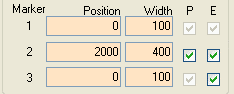
The Position box specifies the data point where you would like to start the marker. The
Width specifies how many data points you would like the marker to be active. The "P" checkbox is only available for Marker 2
and specifies whether you would like active low markers. The "E" checkbox is only available for Marker 2 and Marker 3 and is
used for enabling or disabling those markers. The different characteristics of the three markers are detailed in the
Parameters
page of the Operation Details section.
The Marker is useful as a diagnostic tool. Markers are ONLY output when there is waveform generation. If you have marker enabled but you have no Marker signal then it means that there is no waveform output.
Paging
The AWG module features memory address paging. You can set which user page to use here in this panel (for details, see the description of Multiple waveforms with paging).
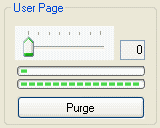
Each user page can load a separate waveform, but the more pages you have, the fewer memory addresses you have available for each waveform -- meaning the maximum data length of each waveform is shorter. Or, the longer the data length of each of your waveforms, the fewer the number of user pages you will have available. The total number of memory addresses is fixed.
Download Waveform
Click this button, located near the lower edge of the waveform panel, to send current waveform parameters to the board. You will have to use this button whenever you change any
waveform parameters.
After a waveform finishes downloading, press the Restart button to enable the AWG outputs.