Special Instructions for Dual Channel Modules
Dual Channel modules (AWG272/472/872) feature effortless synchronization between
the two output channels.
Single Channel operation
When using only one channel of the dual channel modules, please use Channel B and connect to the OUTBP and OUTBN SMA's. The marker settings and timing information are transmitted to the module when you download data to Channel B.
Dual Channel operation
When using both channels of the dual channel modules, you should use the same Data Length for both channels, because the marker settings and timing information are transmitted to the module only when you download waveform data to Channel B.
Any time you change the frequency settings, which you must do any time you change the input clock frequency, you should re-download the waveform data to each channel.
Example: In-phase and Quadrature (I/Q) Sine waves
Set the Frequency
Click on the Signature tab and slide the Clock Frequency trackbar to match the frequency of your input clock source.
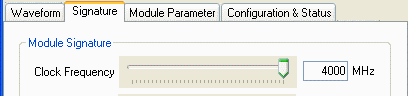
More details on the signature can be found on the signature page.
Download the waveform data to both channels
Click on the Waveform tab.
1. Double-click in the second Waveform Code textbox.
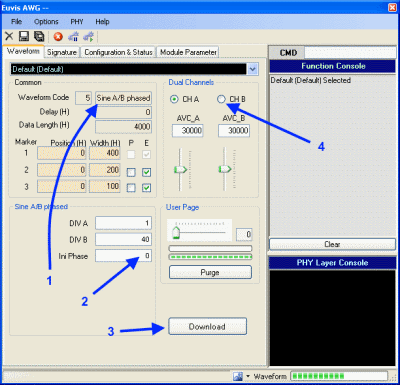
Use the pull down menu to select
the waveform style
named "Sine A/B * phased".
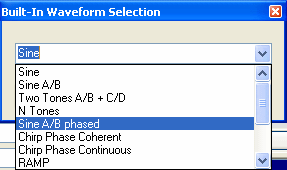
This is a Sine wave for which you can specify the initial phase.
2. Set the phase to 0. The radio button for CH B should already be selected.
3. Click the Download button (near the lower edge, or press F8). The computer then downloads the parameterized data to half of the AWG memory so that the firmware generates the actual waveforms. You must click the Download button each time you finish changing the parameters.
4. Now click the radio button for the other channel, CH A. Repeat steps 2 and 3, but set the Initial Phase to 90 degrees before again clicking the Download button (or pressing F8).
For a brief description of other waveforms available in the graphical user interface,
please see the Waveforms page.
Amplitude Variable Control
You may adjust the output amplitude gain by sliding the AVCA and AVCB trackbars,
corresponding to Channel A and Channel B, respectively. Increasing an AVC value by raising its trackbar will increase the minimum voltage on the corresponding output channel, resulting
in a decreased peak-to-peak amplitude. Usually these should be
set in the middle, to 30000 each.
Abort and Restart
Clicking on the "Abort" button will stop output from the AWG. Or, press F1.
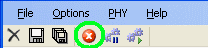
Clicking on the "Restart" button will cause the AWG to start output. After clicking abort, click the Restart button, or press F3.