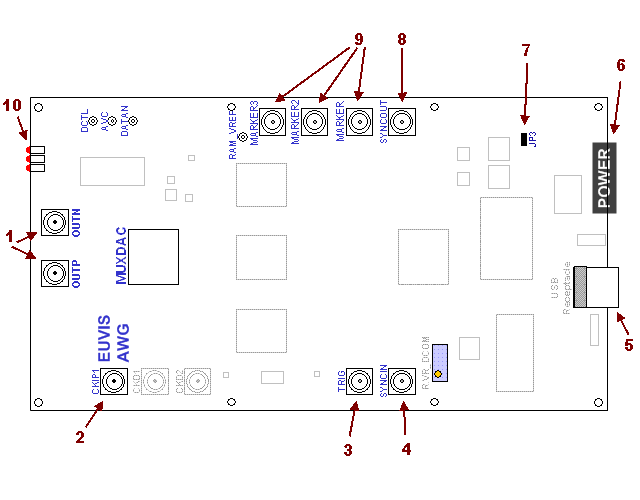
Board Layout -

Board Diagram

The AWG252 board dimensions are 9.5 inches by 5 inches.
The AWG452 board dimensions are 9 inches by 5.25 inches. 

The module is manufactured from 4-layer sandwiched RO4003/FR4/RO4003 with a total thickness of 54 mils. The RF I/O’s are standard SMA connectors and the USB port is a type-B USB receptacle. Two heat sinks are applied to the MuxDAC and the ASIC memory controller.

 
Description
1 OUTP / OUTN (SMA)

SMA connectors for output waveforms. They should be connected to an oscilloscope and a spectrum analyzer. If only using one output, please terminate the unused output with a 50 ohm termination.

 
2 CKIP (SMA)


SMA connector for input clock. Please connect to a clock source with minimum power of 0 dBm.

3 TRIG (SMA)

Optionally connect a trigger signal source to the AWG board. For more information on synchronization, please go to the Synchronization section.

4 SYNCIN (SMA)


SMA connector for SYNCIN signal input. Part of the synchronization process. For more information on synchronization, please go to the Synchronization section.

5 USB receptacle


Please use a type-B USB cable to connect the AWG to your computer any time after you have installed the Software and Drivers.

6 Power Header


Please use the provided plug to connect to the power header. The plug and header can only be connected in one orientation but you MUST make sure that the order of the wires and the power supplies are correct on the plug so that you do not burn out the board. For more information on setting up the plug, please go to the Power Plug section.

7 ROM Jumper (JP3)


For Generic Installation of firmware, you will need to remove this shunt/jumper temporarily before powering up the AWG board. Just before writing to the ROM, you will need to place the jumper back. For normal Firmware Updating, you can leave the jumper in place.

8 SYNCOUT (SMA)


SMA connector for SYNCOUT signal output. Part of the synchronization process. For more information on synchronization, please go to the Synchronization section.

9 MARKERS (SMAs)


SMA connectors for Marker signal outputs. Up to three different markers can be output every time a waveform is output. For details, please see the discussion of how to set the Markers in the waveform panel of the GUI. 

10 LEDs


Six indicator LED's help identify the AWG status.