Scale and Filter
Due to windowing effects from using time-limited waveform data, the frequency spectrum
of analog waveforms may appear to have been convolved with a Sinc, and this filter
is designed to mitigate the effects of that modulation.
This feature allows you to modify the inverse filter frequency factor, the subsequent window applied, and the full-scale amplitude applied to the analog waveform. Digital waveforms, such as ramp, pulse, and user-defined waveforms, are not affected by these settings. Analog waveforms, which are calculated internally with double precision, go through this inverse sinc filter, windowing, a linear scaling factor, and then are translated to full scale amplitude.

We recommend that you leave the Scaling Factor unchanged at 0.9875, and only use this option to turn on or off the filter. If desired, you can change the type of windowing applied to your analog waveform. Remember to re-download the waveform data if you change any of these settings.
Example using Scale and Filter option
To illustrate the Scale and Filter feature, we will apply the filter to a waveform that is not periodic -- Sine at 123,456,789 Hz. The reason we consider this waveform non-periodic is because this frequency is not a regular fraction of our clock frequency, so the actual waveform amplitude data does not repeat. Because of this, the time-domain waveform is not quite periodic, and this results in a frequency spectrum that includes other frequencies. Therefore, it is useful to apply a time-domain windowing filter to such waveforms.
Load the pre-stored Sine 123 MHz (sine_123456789.wfa) waveform file. Or, simply load a Sine waveform at 123,456,789 Hz.
Go to the menu bar and click on Options --> Scaling/Filter.
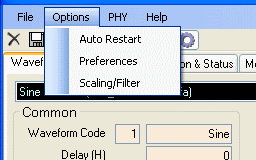
The Scale and Filter box will pop up.
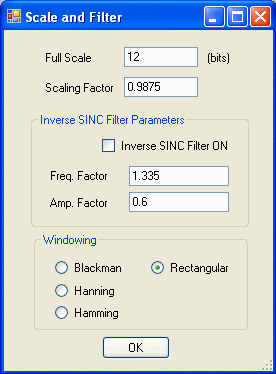
Click on the box for Inverse SINC Filter ON and the Windowing button for "Rectangular",
and then click OK. Download the waveform,
and then press Restart (right-click pop-up menu). You will see a Sine wave near
123 MHz.
Now change the windowing to a different type, such as Hamming, and repeat the download and restart procedure. You will see the frequency spectrum of the sine has been filtered to reduce the spurs.
Also try this with the Inverse SINC Filter turned off. For a narrowband waveform like sine, you will not see any difference, except that the amplitude will no longer scaled by the Amp. Factor set in that section. For a wider-band waveform, the inverse sinc filter will help balance the amplitude across the frequencies.