Module Parameter Window -
General
Clock Frequency
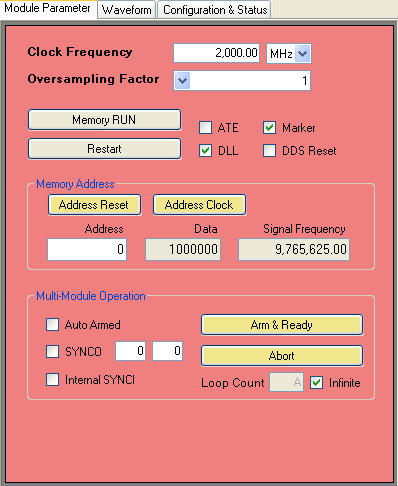
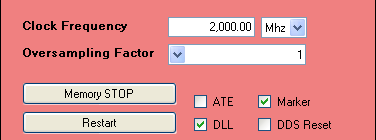
Sets the input clock frequency. It is very important that you have the input clock correct or all of your output waveforms will be wrong. Make sure that the clock frequency is right and that the units is also correct.
Oversampling Factor
When the Oversampling Factor is set to 1, the DSM board outputs each frequency of the chirp for 8 clocks of the input clock. If you set Oversampling Factor to 2, the board outputs each frequency for 16 clocks of the input clock. For Oversampling Factor of 4, board outputs each frequency for 32 clocks of the input clock.
For example, let us assume that the input clock is 2.5 GHz. The default Oversampling Factor of 1 will result in change of frequency every 8 clocks or every 3.2 nanoseconds. Now if we change the Oversampling factor to 2, the output frequency will change every 16 clocks of the input clock or every 6.4 nanoseconds.
Memory RUN/STOP
Stops chirping at current memory address and frequency. When memory is stopped, you can go through each memory address manually and see the frequency stored in each address using the Address Reset and Address Clock buttons.
Memory RUN/STOP is also useful if you wanted to change the input clock frequency in the middle of a chirp. You click the Memory STOP button to temporarily stop the chirp, change the input clock frequency then click on Memory RUN button (same button) and the chirp will start again at the new frequency. Be sure to also change the value in the Clock Frequency box to ensure that the output will match the values in the Waveform window.
ATE
Stands for Address Trigger Edge. ATE is an internal ASIC parameter and is used to control stability of the waveform. If you find that your waveform is not stable try switching this option on and off.
DLL
Stands for Delay Lock Loop. DLL is an internal Cypress CPU parameter and is used also used to control stability of the waveform. Usually when you are operating above 1.5 GHz you should have DLL checked. If you find that your waveform is not stable try switching this option on and off.
Marker
Enables Marker signal output from the MARKER SMA connector. For more information please see Marker on the Waveform window section. Please note that the output level of the Marker is 1.8V for high.
DDS Reset
Stops the DDS output essentially stopping output waveform.
Memory
Address Reset
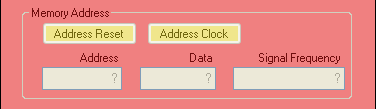
When memory is stopped, you can click this button to view the frequency at the first memory address.
Address Clock
Increments memory location by 1 so you can view output frequencies of sequential memory address. Only enabled when memory is stopped.
Address
Displays the current memory address. Not available unless memory is stopped by clicking on Memory STOP. You may type in a memory address in this box to view the frequency at that address. Address is specified in hexadecimal.
Data
Displays the frequency word data in hexadecimal of the current memory address.
Signal Frequency
Displays actual frequency in decimal of the current memory address.
Internal States
Auto Armed
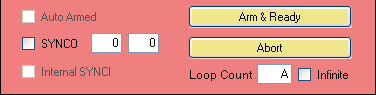
When enabled will auto arm the DSM so that after the "Loop Done" state, the board will automatically go into the "Armed" state and be ready for another trigger signal. You cannot change this option if the board is in Slave mode.
If disabled, the DSM will go into the "Disarmed" state after the "Loop Done" state in which case the user will have to click on the Arm & Ready button to put the board into the "Armed" state. For more information about the internal states please see the Internal States page.
SYNCO
When this is checked and the board is in Master mode, the board will output the SYNCO signal from the SYNCOUT SMA connector on the boards. When in Slave mode, the SYNCO option does not do anything.
The boxes to the right of SYNCO specify the TSYNC1 and TSYNC2 times. The first box specifies the TSYNC1 time while the second box specifies the TSYNC2 time. For both boxes, the minimum value is "0" and the maximum value is "FF" (decimal 255). Both parameters are specified in hexidecimal. For more information on the TSYNC times please go to the Synchronization page.
Internal SYNCI
When this is enabled in Master or Standalone mode, the internal SYNCI signal will mirror the SYNCO. You cannot change this option if the board is in Slave mode. For more information please go to the Synchronization page.
Arm & Ready
You will need to click on this button to put the board in the "Armed" state whenever you load a new waveform. Additionally, if Auto Armed is not checked you will have to click on this to manually put the board into "Armed" state after the board finishes outputting the waveform loops.
Abort
You may click on this button at any time to put the board into the "Disarmed" mode.
Loop Count
Specifies the number of waveforms to output for each trigger signal. If you want an infinite loop or continuous output, please check Infinite. For finite values, the Loop Count is specified in hexadecimal.