Hardware Setup
Outputs
» Connect your oscilloscope and spectrum analyzer to the OUTP and OUTN SMA connectors. They are 50-ohm back terminated, so you can connect one or both, in either order.
Clock Source
» Connect your clock to the
CKIP SMA near the upper left corner of the board, and set the frequency and power level to (typical operating
specifications):
AWG272: 2 GHz with power +6 dBm
AWG452: 4 GHz with power +9 dBm
AWG472: 4 GHz with power +14 dBm
AWG801: 4 GHz with power +12 dB
AWG872: 4 GHz with power +15 dB
» For optimal performance, the clock source should have sharp transitions.
Trigger (optional)
» For single-module free running operation, you do not need a trigger signal. For multi-module operation, or for operation in a triggered mode, you may want to use a trigger source so that the master module will generate a SYNCO signal periodically. Set your trigger source, such as a function generator, to a 1 kHz square wave with 1 Vpp amplitude and 0.5 V DC offset (for a 50 ohm load; set the amplitude higher if your setting is for high impedance). Connect your trigger source to the TRIG SMA connector on the back of the module.
Power Supply
The AWG requires one +12V input which is provided by the included 120V-240V AC power adapter which can be plugged into any compatible wall socket. Insert the barrel end of the power supply to the connector marked +12V on the back of the AWG module.USB port
» Connect the AWG board to your PC with a USB cable only if you have already installed the software and drivers.
» If you have not installed all the software and drivers, please do not connect to the USB port. You can still operate the board in standalone mode.
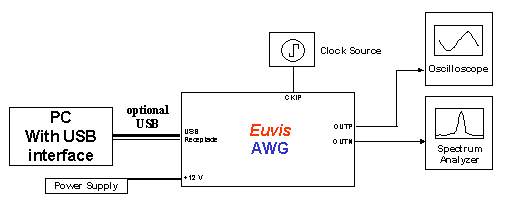
» Schematically, the connections should look like the diagram below:
Power On
» Flip the switch to the "I" position to power up the AWG.
» If you have done everything correctly, then you should see the power-up
waveform output on your
oscilloscope and your spectrum analyzer after a few seconds.
The power-up waveform is pre-stored in the firmware and is automatically loaded at startup.
Even with a PC connected to the AWG, the built-in waveform loads and
runs before the PC
downloads a new waveform to the board, although
you must press the Restart button in the AWG_WIN.exe application once you have started
the program.
The power-up waveform is a sine wave at 1/32 input clock speed.
» The built-in waveform can be customized upon request.