Channel Control Group Box -
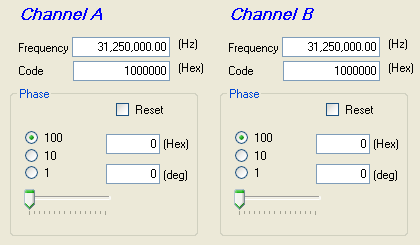
The two channel control group boxes contain the frequency and phase parameter inputs. The frequency inputs are comprised of 2 text box inputs to control the frequency. The phase inputs are comprised of 3 radio buttons, a horizontal scroll bar, 2 text box inputs, and 1 checkbox.
Frequency
The Frequency text box specifies the channel's output frequency. The user should type the desired frequency in Hz.
The Code text box is an alternate way to specify the output frequency. The Frequency in Hz is a function of the Code in Hex and the input clock frequency. When you enter a value in either the Frequency or the Code text box, the other box will display the corresponding value, and the SYN output will change.
Relative Phase
The radio buttons select the magnitude of each step of the Phase adjustment scroll bar.
Slide the scroll bar to adjust the relative phase of the channel output.
The text boxes can be used to enter directly
the hexadecimal code of the desired phase or the actual phase in degrees.
When you enter a value in either text box, the other box will display the corresponding value, and the SYN output will change.
Toggle the Reset checkbox to reset and set the channel output. Please note that
both channels will reset together. You may need to reset and set the channel more
than once.